直譯語言和編譯語言是程式語言的一種分類,自己在有 server-side 的程式中寫 PHP 寫久了,都快忘記編譯語言會有編輯檔案以及編譯後的檔案。 這時會開始苦惱幾個需求:
- 在 server 上只 pull 下編譯後檔案即可
- 編輯檔還是需要版控
- server 上儘量不要搞太多東西,要不以後架設會很麻煩
- 儘量自動化
版控使用 git 來實現,因為部屬到 server 是 master branch,所以打算開一個 dev branch 來處理編輯,然後測試沒問題以後再 marge 到 master branch ,然後 npm run build 把產生的 dist 的資料夾(編譯後的檔案) push 上去。
參考:

HowTo have specific .gitignore for each git branch
HowTo have specific .gitignore for each git branch – gitignore_per_git_branch.md
可以透過 git 之中的 hook 達到目的。
他的原理是透過 git hook 在 checkout 的時候,取得對應不同 branch 的 .gitignore.{branch name} 檔案,讀取裡面的設定實現 git ignore 的功能,以達到不同 branch 能夠指定不同需要 ignore 檔案的目的。
主要的作法是在 .git/hooks 之中建立一個 post-checkout 檔案(該檔案名稱對應 hook 行為):
#!/bin/sh

old_ref=$1
new_ref=$2
branch_switched=$3

if [[ $branch_switched != '1' ]]
then
    exit 0
fi
echo "---- POST CHECKOUT ----"
current_branch=$(git rev-parse --abbrev-ref HEAD)
hook_dir=$(dirname $0)
root_dir="$(pwd -P)"
info_dir="$root_dir/.git/info"

exclude_target='.gitignore'
if [[ -f "$root_dir/$exclude_target.$current_branch" ]]
then
	echo "Prepare to use .gitignore.$current_branch as exclude file"
    exclude_target=.gitignore.$current_branch
fi
cd "$info_dir"
rm exclude
#ln -s $exclude_target exclude
echo "Copy .gitignore.$current_branch file in place of exclude"
cp "$root_dir/$exclude_target" exclude
echo "--- POST CHECKOUT END ---"
然後執行 git init ,重新啟用 git hooks。
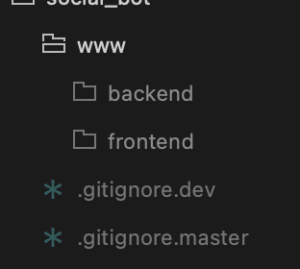
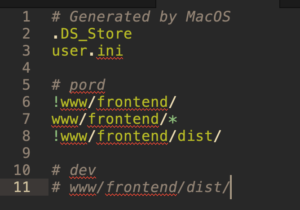
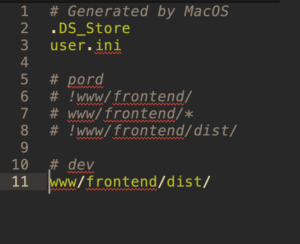
之後實作 .gitignore 時,檔案名稱依照分支加上後綴即可。例如是 dev 分支下,添加 .gitignore.dev 檔案即可生效;在 master 中,添加 .gitignore.master 就行啦。
附上設定截圖更清楚:
同場加映: