標籤: vue

  • vue3 學習筆記 EP4

    axios 套件介紹,請參考這裡

    這是一個很好用的 AJAX 套件,目前有兩個需求:

    1. 需要一個統一的前置作業,例如 baseUrl 設定、timeout 設定等等。
    2. 需要避免每個 router 的 template 有用到就創建一個實例。
    3. 未來其他功能套件,想要讓各種設定儘量在同一個地方都找得到。

    所以這邊選擇一個封裝和單例的實作來處理。因為網路上找到的作法實在太多,又初學導致一直碰壁,這邊記錄下目前認為最恰當的方法,參考這裡(雖然說文章內建議的方法是使用 ES modules):

    首先確定安裝好 axios 套件,這邊使用 npm 安裝:

    npm install axios

    確保有安裝 Pinia 套件,參考這裡

    npm install pinia

    建立一個 plugins 外掛集合,透過 pinia 存在全域。注意未來如果有其他套件,建議拉一個資料夾管理並確實作好 import:

    # src/composables/plugins.js
    import axios from 'axios'
    import { defineStore } from "pinia";
    
    export const useAppPlugins = defineStore({
      id: "appPlugins",
      state: () => {
        return {
          axios : axios.create({
            baseURL: '',  
            timeout: 10000  
          })
        }
      }
    });

    使用上,引用 plugins.js 中把要用的外掛都抓進來,就可以直接使用了:

    <script>
    import { useAppPlugins } from '@/composables/plugins.js';
    const appPlugins = useAppPlugins();
    
    export default {
    	data(){
    		return {
    			...
    		}
    	},
    	mounted() {
    		...
    	},
    	beforeUnmount() {
    		...
    	},
    	methods: {
    		submitForm: () => {
    
    			let api = appPlugins.axios;
    			console.log(api);
    			api.get('/api/login_config')
    	      .then( (response) => {
    	      	console.log(response);
    	      } )
    	      .catch( (error) => { // 请求失败处理
    	        console.log(error);
    	    });
    		},
    		gotoForgetPwd: (username, event) => {
    			console.log("gotoForgetPwd");
    			console.log(event.target.tagName);
    			
    		}
    	}
    }

    未來如果有其他外掛需要於全域設定的也能夠加入到 appPlugins 中提供呼叫。

    文件中有提到一些好處:

    • Documented APIs.
    • Familiarity among developers.
    • Standard usage patterns that, by design, avoid common problems.
    • Integration with Vue Devtools.
    • You don’t have to maintain the code yourself.

    另外我認為未來在同一個專案中如果有不同的應用場景,可以建立不同外掛集合的檔案提供呼叫,這樣可以整理成一個檔案呼叫,減量減少一個 vue 檔案要 import 一堆而且還要注意上下傳遞關係的麻煩。

    目前對 ES modules 方式的疑或是:每一個 vue 檔案 import 一次,他會不會就直接 create 一個新的實例?
    2022-10-16 update: 這邊在 axios.create 中 baseURL 參數用隨機產生。發現 ES modules 的方法每次 import 都不會產生新的 baseURL 。並不會每次 import 就 create 一次的。

    另外有翻到一個套件叫做 vue-axios ,看起來是包好直接放在 windows 裡面,這有空可以來試試。

    vue-axios
    A small wrapper for integrating axios to Vuejs. Latest version: 3.5.0, last published: 3 days ago. Start using vue-axios in your project by running `npm i vue-axios`. There are 500 other projects in …

    同場加映,單例的設計模式參考:

    单例模式 | 菜鸟教程
    单例模式 单例模式(Singleton Pattern)是 Java 中最简单的设计模式之一。这种类型的设计模式属于创建型模式,它提供了一种创建对象的最佳方式。 …

    貼心翻譯給看不懂簡體的繁體中文使用者,重點是這些:

    意圖:保證一個類僅有一個實例,並提供一個訪問它的全局訪問點。
    主要解決:一個全局使用的類頻繁地創建與銷毀。
    何時使用:當您想控制實例數目,節省系統資源的時候。
    優點:

    1. 在內存里只有一個實例,減少了內存的開銷,尤其是頻繁的創建和銷毀實例(比如管理學院首頁頁面緩存)。
    2. 避免對資源的多重佔用(比如寫文件操作)。

    缺點:

    1. 沒有接口,不能繼承,與單一職責原則衝突
    2. 一個類應該只關心內部邏輯,而不關心外面怎麼樣來實例化。

    使用場景:

    1. 要求生產唯一序列號。
    2. WEB 中的計數器,不用每次刷新都在數據庫里加一次,用單例先緩存起來。
    3. 創建的一個對象需要消耗的資源過多,比如 I/O 與數據庫的連接等。

    同場加映,單例與全局變量差異:

    JavaScript: global variables vs singletons
    If singleton is available globally, how is it different from a global variable that has a single instance?

    單例滿多缺點的爭議,可以參考這個討論串

  • vue3 學習筆記 EP3

    直譯語言和編譯語言是程式語言的一種分類,自己在有 server-side 的程式中寫 PHP 寫久了,都快忘記編譯語言會有編輯檔案以及編譯後的檔案。 這時會開始苦惱幾個需求:

    1. 在 server 上只 pull 下編譯後檔案即可
    2. 編輯檔還是需要版控
    3. server 上儘量不要搞太多東西,要不以後架設會很麻煩
    4. 儘量自動化

    版控使用 git 來實現,因為部屬到 server 是 master branch,所以打算開一個 dev branch 來處理編輯,然後測試沒問題以後再 marge 到 master branch ,然後 npm run build 把產生的 dist 的資料夾(編譯後的檔案) push 上去。

    參考:

    HowTo have specific .gitignore for each git branch
    HowTo have specific .gitignore for each git branch – gitignore_per_git_branch.md

    可以透過 git 之中的 hook 達到目的。

    他的原理是透過 git hook 在 checkout 的時候,取得對應不同 branch 的 .gitignore.{branch name} 檔案,讀取裡面的設定實現 git ignore 的功能,以達到不同 branch 能夠指定不同需要 ignore 檔案的目的。

    主要的作法是在 .git/hooks 之中建立一個 post-checkout 檔案(該檔案名稱對應 hook 行為):

    #!/bin/sh
    
    old_ref=$1
    new_ref=$2
    branch_switched=$3
    
    if [[ $branch_switched != '1' ]]
    then
        exit 0
    fi
    echo "---- POST CHECKOUT ----"
    current_branch=$(git rev-parse --abbrev-ref HEAD)
    hook_dir=$(dirname $0)
    root_dir="$(pwd -P)"
    info_dir="$root_dir/.git/info"
    
    exclude_target='.gitignore'
    if [[ -f "$root_dir/$exclude_target.$current_branch" ]]
    then
    	echo "Prepare to use .gitignore.$current_branch as exclude file"
        exclude_target=.gitignore.$current_branch
    fi
    cd "$info_dir"
    rm exclude
    #ln -s $exclude_target exclude
    echo "Copy .gitignore.$current_branch file in place of exclude"
    cp "$root_dir/$exclude_target" exclude
    echo "--- POST CHECKOUT END ---"

    然後執行 git init ,重新啟用 git hooks。

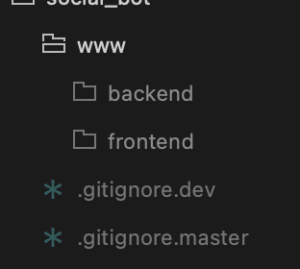
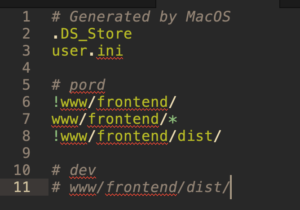
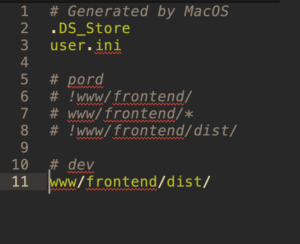
    之後實作 .gitignore 時,檔案名稱依照分支加上後綴即可。例如是 dev 分支下,添加 .gitignore.dev 檔案即可生效;在 master 中,添加 .gitignore.master 就行啦。

    附上設定截圖更清楚:


    同場加映: