分類: 筆記x備忘

  • Flutter 在 Mac 上安裝錯誤的解決方法

    最近在摸 Flutter 的專案,在 Mac 環境下一直裝不起來,先姑且不抱怨 Android Studio 在 MacOS 更新後突然跑超慢的,Flutter 安裝時似乎是抓不到 Android 設定檔案的位置,導致:

    [✓] Android Studio (version 3.1)
        ✗ Flutter plugin not installed; this adds Flutter specific functionality.
        ✗ Dart plugin not installed; this adds Dart specific functionality.

    一直出現類似的錯誤。後來參考鏈結

    Safe fix for Mac (Android studio 4.1+) It is in a different directory now, but symlink helps.
    Just run in the Terminal this command:

    ln -s ~/Library/Application\ Support/Google/AndroidStudio4.1/plugins ~/Library/Application\ Support/AndroidStudio4.1

    記得路徑換成正確的,此時是 AndroidStudio4.1
    soft link 建立起來以後就正確啦!

    筆記一下 Flutter 使用的 Dart 程式語言資料,找不到快速索引的文件,如果有找到再放上來。

    Day 1:為什麼要用 Flutter ? – iT 邦幫忙::一起幫忙解決難題,拯救 IT 人的一天
    本篇文章同步發表在 HKT 線上教室 部落格,線上影音教學課程已上架至 Udemy-HKT線上教室。想追蹤更多相關技術資訊,歡迎到 臉書粉絲專頁 …

  • Linode VPS 轉移擁有權限

    Linode 是一個總部建立於美國紐澤西州加洛偉的虛擬專用伺服器(VPS)提供商。它的名字是由英文中 Linux 中的 Li 和 node(即「節點」一詞)構成的混成詞。如同它的名字一樣,Linode 只提供執行 Linux 的伺服器,而不提供執行 Windows Server 或其他作業系統的伺服器。它的服務一向以穩定著稱。

    WIKI 維基百科 – https://zh.wikipedia.org/wiki/Linode

    當系統開發完成以後,會遇到有沒有需要將伺服器交接給客戶的選擇。一般除非是要自己維護,要不伺服器的租金等都會請客戶開一個帳戶、設定好支付管道,然後把伺服器的權限轉移到客戶帳戶裡面。

    Update 2021-07-11: 最近在做轉移擁有權限時,客服提醒現在已經有自助式的操作方法。

    自助鏈結:https://cloud.linode.com/account/service-transfers

    原文:

    The Service Transfer feature can be used to transfer ownership of certain Linode services to another account. Here’s how it works:

    1. The sending account initiates a transfer by generating a Service Transfer token.
    2. The sending account sends the Service Transfer token to the receiving account by email or other method.
    3. The receiving account uses the Service Transfer token within 24 hours to accept the transfer between the two accounts.
    4. Once completed, billing for transferred services ends for the sending account and begins for the receiving account. Linode services will not experience interruptions due to the transfer process.

    Things to keep in mind:

    • If any of the Linodes included in the request have our Backup Service enabled, the Backup Service and its associated backups will be transferred as well.
    • DNS records will not be transferred or updated. Please ensure that DNS records have been updated or communicated to the recipient prior to the transfer.
    • Service Transfers cannot be cancelled once they have been accepted by a receiving account. Take care when sharing your Service Transfer token, and only transmit it in a secure manner.
    • Only Linode plans are available for transfer at this time.

    More information on self-service Linode transfers can be found in the following doc: https://www.linode.com/docs/guides/service-transfers

    這邊幫忙翻譯一下:

    服務轉移功能可用於將某些 Linode 服務的所有權轉移到另一個帳戶。這是它的工作原理:

    1. 發送帳戶通過生成服務傳輸令牌來啟動傳輸。
    2. 發送帳戶通過電子郵件或其他方法將服務傳輸令牌發送到接收帳戶。
    3. 接收賬戶在 24 小時內使用 Service Transfer 令牌接受兩個賬戶之間的轉賬。
    4. 完成後,傳輸服務的計費將在發送帳戶中結束,在接收帳戶中開始。Linode 服務不會因傳輸過程而中斷。

    要記住的事情:

    • 如果請求中包含的任何 Linode 啟用了我們的備份服務,備份服務及其關聯的備份也將被傳輸。
    • DNS 記錄不會被傳輸或更新。請確保在傳輸之前已更新 DNS 記錄或將其傳達給收件人。
    • 服務轉賬一旦被接收賬戶接受,便無法取消。共享您的服務傳輸令牌時要小心,並且只以安全的方式傳輸它。
    • 目前只有 Linode 計劃可供轉讓。

    有關自助 Linode 轉移的更多信息,請參見以下文檔:https : //www.linode.com/docs/guides/service-transfers

    以上。

    然後,昨天 Linode 有些問題,導致連線都連不上,紀錄一下。

    2020-07-10 Linode 服務出問題啦,這是 11 號說明已經獲得控制的狀況

    —– 如果還是想要發 ticket 的話可以參考以下 —–

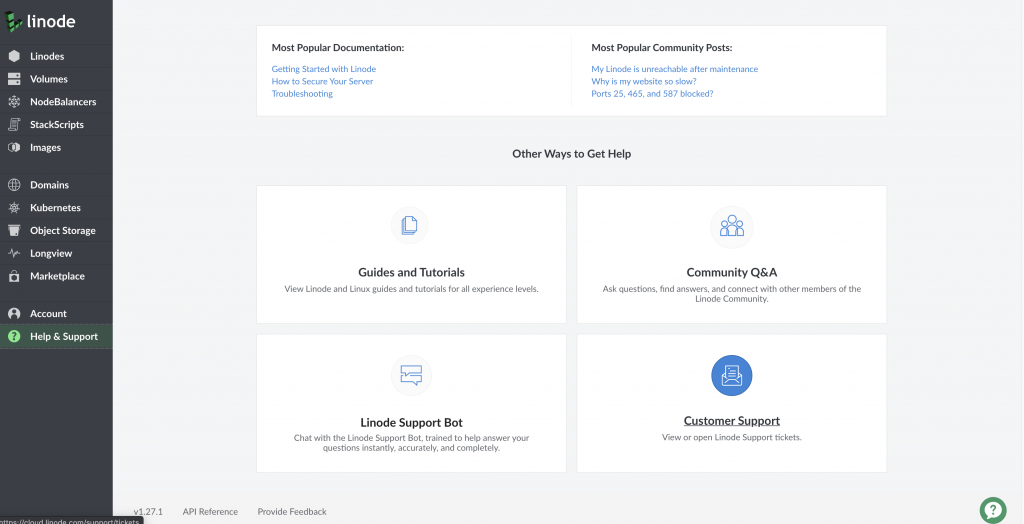
    轉移的方法就是聯繫客服啦!目前在 Help & Support 選單中往下滑, Customer Support 裡面,可以創建 ticket 發給客服

    這邊紀錄一下聯繫客服會用到的 ticket 樣板:

    首先,要轉移的帳號先發信:
    標題:Please Help Me Transfer The VPS

    Please Help me Transfer The VPS To 新帳號 Account.
    The Linode name is 伺服器名稱, ip is IP名稱.
    Transefer to account ‘新帳號’.
    Thank you.

    然後會產生一個 ticket 的編號,這時切換到新帳號,表明要允許這個這個 ticket 編號的請求:
    標題:Accept The Support Ticket 編號

    Hi, I accept the Support Ticket
    #編號
    The Linode name is 伺服器名稱,,
    Ip is IP名稱.
    The username of the sending account is ‘原來的帳號’.

    兩邊都發出 ticket 以後就可以等待客服回覆啦,一般通常一個工作天內就會處理上的,保險起見建議抓兩個工作天來處理這樣。

  • Cloudflare 的 port

    筆記一下被搞了半天的 port, Cloudfalre 針對 HTTP/HTTPS 流量有支援的 port,轉貼自:

    识别与 Cloudflare 的代理兼容的网络端口
    了解 Cloudflare 默认代理哪些网络端口,以及如何为其他端口开启 Cloudflare 的代理。 概述 Cloudflare 默认代理发往下列 HTTP/HTTPS 端口的流量。 Cloudflare …


    以下擷取翻譯:

    Cloudflare 默认代理发往下列 HTTP/HTTPS 端口的流量。

    Cloudflare 支持的 HTTP 端口:

    • 80
    • 8080
    • 8880
    • 2052
    • 2082
    • 2086
    • 2095

    Cloudflare 支持的 HTTPS 端口:

    • 443
    • 2053
    • 2083
    • 2087
    • 2096
    • 8443

    如果您的域的流量要发送到上面列出的端口以外的其他端口,则可以:

    通过 WAF 规则 ID 100015 针对 Pro、Business 和 Enterprise 域阻止除 80 和 443 以外的其他端口上的流量:”Block requests to all ports except 80 and 443″.

    只有端口 80 和 443 可兼容以下服务:

  • 蒐集語言的設計模式(Design Pattern)實現

    紀錄一下有用到的語言所實現的設計模式。這邊儘量找比較大的網站鏈結,避免突然斷掉打不開。以自己有在用的語言為主。

    提醒一下閱讀設計模式之前,可能會需要用到的一些知識會比較好理解:

    1. UML 統一塑模語言
    2. OOP 物件導向程式設計(其實也不一定會用到)

    而語言不斷進化,會有各種版本,有些設計模式實作的工法可能已經頗舊了,而且不是很推崇一定任何工法都要依照設計模式,主要還是他的設計邏輯以及原始模式所規劃的精神比較重要,會用會變通,能跑夠安全。讚讚。

    首先是 JAVA,自己主要還是在 Android 使用的。

    设计模式 | 菜鸟教程
    设计模式 设计模式(Design …

    再來是 Swift,他版本進化的速度有一點兒快。

    ochococo/Design-Patterns-In-Swift
    ? Design Patterns implemented in Swift 5.0. Contribute to ochococo/Design-Patterns-In-Swift development by creating an account on GitHub.

    Python 的設計模式。這個網站裡面也有其他語言,滿好看的。

    Python 常用设计模式
    学习 Python 设计模式,所有学习资料包含详细代码示例。立即开始学习!

    Golang 的設計模式。不愧是當紅的語言,有點多。

    senghoo/golang-design-pattern
    设计模式 Golang实现-《研磨设计模式》读书笔记. Contribute to senghoo/golang-design-pattern development by creating an account on GitHub.

    還有常用的 PHP,在 github 上也有專案,可以下載下來參考。

    PHP 设计模式说明 |《PHP 设计模式全集 2018》| PHP 技术论坛
    简介 这是一组已知的 设计模式 和一些在 PHP 中实现它们的示例代码。 每个模式都有一个例子列表(其中大多数来自 Zend Framework,Symfony2 或 …

    Javascript 不是很熟,不過還是找來放一下,以後也許會用到。

    SDLyu/JavaScript
    Contribute to SDLyu/JavaScript development by creating an account on GitHub.